
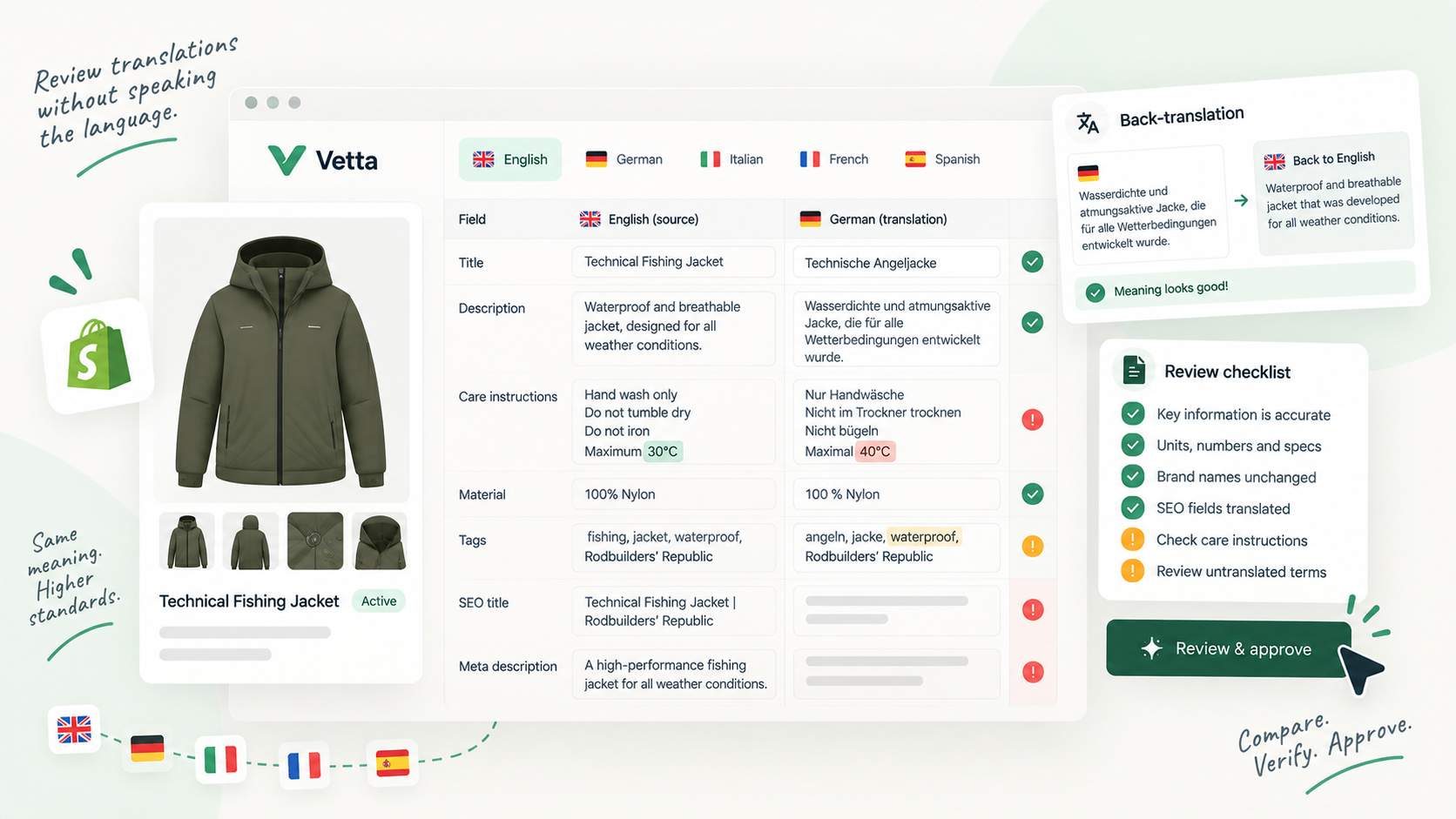
Key takeaways
- Most translation errors that matter (wrong numbers, missing fields, untranslated text, empty SEO fields) can be caught without speaking the language.
- Always review the translation next to the source, field by field, rather than reading the translated page on its own.
- Back-translation with a different tool is a fast way to spot meaning drift, but it can't judge tone or naturalness.
- Anything customers rely on to buy safely (sizing, care, safety, legal claims) deserves a native speaker's read.
Start from the source, field by field
The worst way to review a translation is to open the translated product page and read it. If you don’t speak the language, everything looks plausible. The better way is to put the source and the translation side by side and compare them field by field: title, description, SEO title, meta description, URL handle, and any metafields that show text on the storefront.
On Shopify, translations are stored per field. The Translate & Adapt app lets you pick a language and a resource and enter or generate the translation for each field, and you can also open a product and use More actions > Localize. Automatic translation fills most text fields, but Shopify notes that automatic translations are a good starting point that you may want to review and refine.
Before reading a single word, check the structure:
- Same number of paragraphs, bullet points and headings in the description
- Same bold, links and lists (a missing link often means a broken HTML tag)
- Length in the same range: German often runs longer than English, but a translation half the length of the source has usually dropped something
- Every field that is filled in the source is filled in the translation
Structure problems are the easiest errors to catch. They usually mean HTML or formatting was lost somewhere between the source and the translated field.
Check what should never change
Some content must survive translation intact. You can check all of it without understanding the sentences around it.
Numbers. Weights, dimensions, capacities, quantities in a pack, temperatures, percentages. Say a store sells merino sweaters and the source says “machine washable at 30 °C”. The translation must still say 30, not 40, and not 86 °F unless you decided to convert. Watch the decimal separator too: “1.5 kg” in English is usually written “1,5 kg” in French, German, Spanish and Italian. A translation that keeps “1.5” is not wrong in meaning but looks foreign. Worse, “1,500 g” (fifteen hundred grams) copied unchanged into a German text reads as one and a half grams.
Sizes and units. If the source mixes systems (“fits EU 42 / US 9”), both must remain. If you sell into markets that expect different size charts, decide the rule once and check it on every product.
Brand and product names. Your brand name, collection names you trademarked, material names you use as a selling point. Keep a short glossary: each term, whether it is translated or kept as is, and the approved translation per language. Then search the translated fields for each glossary term. This one step catches a classic error: a product line name translated literally into a common noun.
Anything with a digit in it, and anything in your glossary, gets checked on every translation, every time.
Back-translate with a second tool
Back-translation means translating the translated text back into your own language and comparing it with the source. Use a different machine translation tool than the one that produced the translation: the same engine tends to reverse its own choices and hide the drift.
What back-translation catches well:
- meaning changes (“water-resistant” that came back as “waterproof”)
- dropped qualifiers (“up to”, “approximately”, “for most skin types”)
- sentences that were skipped or merged
- claims that got stronger or weaker in translation
What it doesn’t catch: tone, register, awkward phrasing, the wrong level of formality for the market, or a word that is technically correct but that no customer in that country would use. For those you need a person who speaks the language.
Do back-translation on the fields that carry claims (description, bullet points, metafields with specifications), not on every tag.
Spot untranslated and mixed-language fields
A common failure on multilingual stores is not a bad translation but a missing one: a field left in the source language, or a description where the first paragraph is translated and the rest isn’t. You don’t need to read the language to see it. Look for:
- words you recognise instantly in the middle of a foreign text
- a field identical to the source (often a metafield or a tag added after the translation was done)
- model names, SKUs or codes in the text that were “translated” or altered
Also check freshness. In Translate & Adapt, automatic translations become “out of sync” when the source language is updated after the translation ran; running auto-translate again updates empty and outdated content. If someone edited the English description last week, assume the other languages may still describe the old version until you’ve checked.
SEO fields and handles per locale
The SEO title and meta description are separate fields and need their own check in each language. Verify that they exist, that they are in the right language, and that the SEO title still leads with the term people search for in that market rather than a literal translation of your English keyword.
URL handles need special attention on Shopify. According to the Help Center, automatic translation in Translate & Adapt doesn’t include URL handles: you add a translated handle manually for each language. When you do, redirects are created from the default language URL and sitemaps update to include the translated handles. The products part of the URL can’t be translated, and handles can’t be customised per market. So unless someone deliberately sets a Spanish handle, the Spanish page keeps the default one, for example /es/products/merino-crew-sweater.
Shopify adds hreflang tags automatically based on your markets and languages configuration, so you don’t need to add them by hand. What you do need to check is that each language version actually contains translated content, so the page search engines index for that language is worth indexing.
When to ask a native speaker
Mechanical checks catch errors. They don’t make copy good. Bring in a native speaker when:
- the page makes safety, health, legal or regulatory claims
- sizing or fit advice drives returns in that market
- the product is a bestseller or a launch you will advertise
- back-translation shows drift you can’t resolve yourself
- the copy relies on humour, wordplay or a brand voice
A good compromise for a large catalogue is to have a native speaker review a sample and your glossary once, then apply the mechanical checks to everything else. Their corrections feed the glossary, and the glossary makes every later review faster.
The review checklist
Run this on the proposed translation, field by field, next to the source.
- Every field filled in the source is filled in the translation
- Paragraphs, lists, links and headings match the source
- Every number, unit and size matches the source
- Decimal separators follow the target language
- Glossary terms appear as approved
- No leftover source-language words or sentences
- Model names, codes and links are intact
- Back-translation shows no change in meaning or claims
- SEO title and meta description exist and are translated
- URL handle translated if you use localized handles
- Translation is not out of sync with a newer source
- High-stakes pages read by a native speaker
Vetta is built around this kind of side-by-side review. A proposed version shows the source language and each published translation in the same screen, one tab per locale, each with a field-level diff of what is live against what is proposed: title, handle, descriptions, SEO title, meta description, tags and metafields. Nothing reaches the storefront until a reviewer approves it, and you can request changes with a note that says exactly which field failed which check. More on how the gate works on the approval workflow page.
Sources and references
- Add language translations using the Translate & Adapt appShopify Help Center · documentation
- International SEO for marketsShopify Help Center · documentation

Hugo built his first Shopify stores around 2015, while studying management and accounting, after teaching himself to code as a teenager. He then specialised in digital marketing at ESCEN in Bordeaux and has worked with clients since 2018, first in web communication, then as a webmaster. Since 2020 he has led IT projects at Rodhouse, including its full migration to Shopify in 2023, and is now its Tech Lead. Vetta grew out of a problem he kept meeting with clients: content changed by people nobody had checked, with no way back. Away from the screen, he travels, keeps a close eye on investing and new technology, and spends as much time as he can on the water.
Frequently asked questions
Does Shopify translate URL handles automatically?
No. According to Shopify's Help Center, automatic translation in the Translate & Adapt app doesn't include URL handles: you add a translated handle manually for each language. When you do, redirects are created from the default language URL and sitemaps include the translated handles.
Is machine translation good enough for product pages?
It is a reasonable first draft, and Shopify itself describes automatic translations as a starting point to review and refine. The risk is in details: units, sizes, brand terms and fields that were left untranslated. Review those systematically before publishing.
What is back-translation?
Translating the translated text back into your own language, ideally with a different tool than the one that produced it, and comparing the result with the source. Differences in meaning show up quickly, even if you don't read the target language.