
Key takeaways
- Review against the live version: a diff shows you what changed, so you spend your attention there instead of on text you already approved.
- Read fields in order of risk: title and handle first, because they change what customers and search engines see before anything else.
- Request changes when the fix is small and clear, reject when the version starts from a wrong premise.
- A good review note names the field, the problem and the expected fix, in one or two sentences.
Why a diff beats rereading the whole page
When an AI agent or a copywriter proposes a new version of a product, most of the page is often unchanged. Rereading everything means spending most of your attention on sentences you approved months ago, and by the time you reach the paragraph that actually changed, you are skimming.
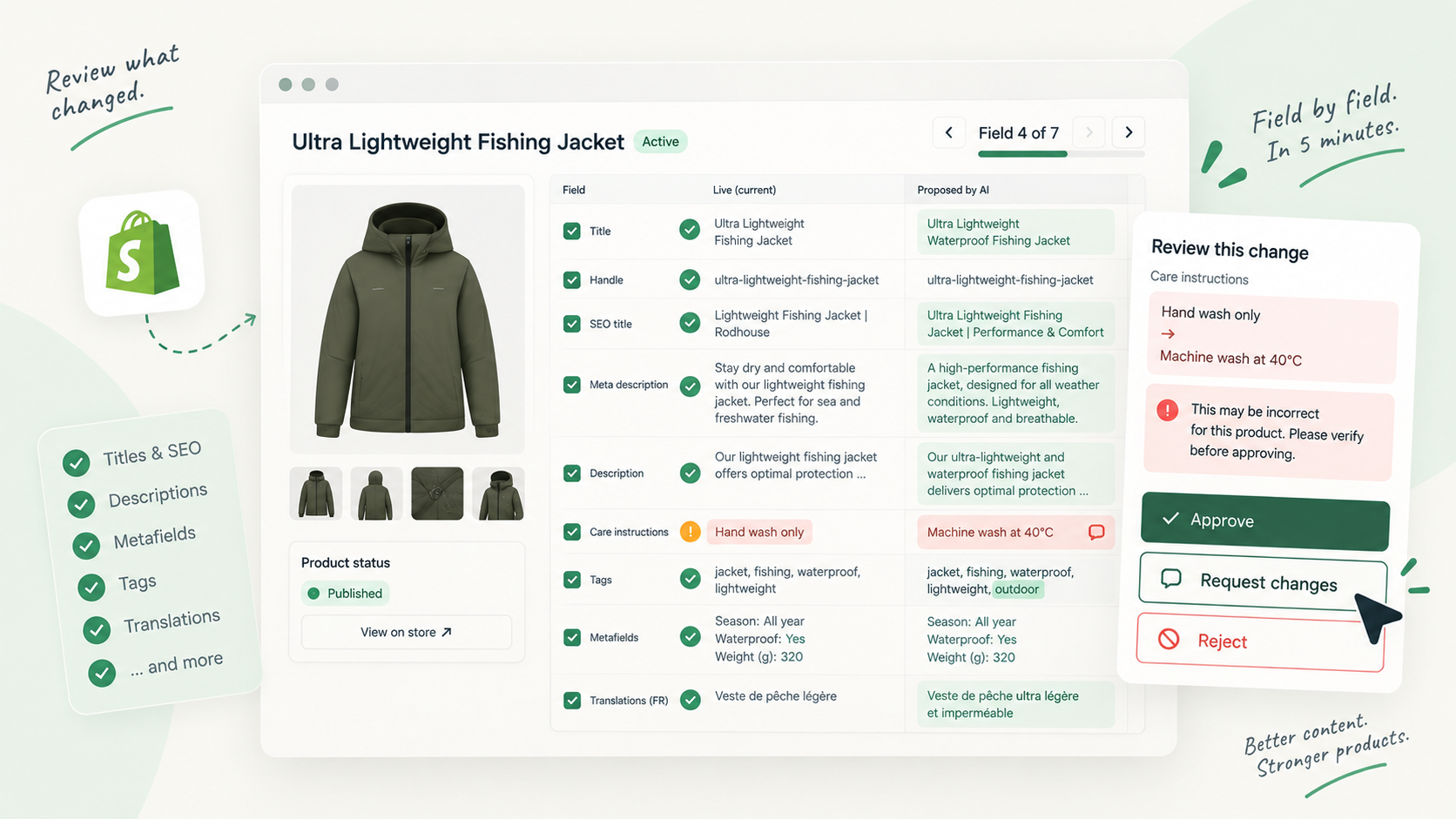
A diff flips that. You compare the proposed version with the live one, field by field, and only the differences are highlighted. A removed “100% merino” jumps out. So does a care instruction that went from “hand wash” to “machine wash 40 °C”. You still read the whole field when a rewrite is extensive, but you read it knowing what was there before.
Reviewing is not proofreading. Your job is to decide whether each change is true, useful and safe to publish.
The other advantage is that a field-level comparison forces you to look at fields you would never notice on the storefront: the handle, the SEO title, the meta description, metafields, and each translation.
The reading order, field by field
Read in order of impact. The fields at the top change what customers and search engines see first, and a mistake there costs the most.
1. Title
Check that the product is still named the way customers search for it and the way your catalogue names similar items. Look for invented attributes (“waterproof” on a jacket that is only water-resistant) and brand or trademark terms you are not allowed to use.
2. Handle
The handle is the end of the product URL. If the proposal changes it, stop and ask whether that change is needed. Shopify’s own help warns against editing handles too often, and the old URL needs a redirect so links and search results keep working. In most AI rewrites, the right answer is to leave the handle alone.
3. SEO title and meta description
These are what appears in search results. Check that the SEO title leads with the product and its main attribute, that the meta description makes a concrete promise the page keeps, and that neither repeats the title word for word. Watch for claims here that the description does not support.
4. Description
This is where most of the change is, and where the diff helps most. Check every fact: materials, dimensions, compatibility, origin, care, safety. Anything you cannot trace to your product data or to someone on your team is a candidate for removal. Then read once for tone: does it sound like your store, or like every store?
5. Tags
Tags often drive collections and filters. A new tag can move the product into a collection it does not belong to; a removed tag can drop it out of one. Check each added or removed tag against how your collections are built.
6. Metafields
Metafields hold structured data your theme displays: sizing tables, specifications, ingredients, badges. Check units, number formats and that values match the type expected by the theme. A wrong value here can look perfectly normal in the text and still break a filter or a spec table.
7. Translations
Open each locale. Two things go wrong: the translation was not updated when the source text changed, so it still describes the old version, or it was machine-translated and now contradicts the source on a fact. Compare each translation against its own live version, and spot-check that key facts (numbers, materials, care) match the source language.
The 5-minute checklist
Use this as a fixed routine for every proposed product version.
- Title names the product the way customers search for it
- No invented attribute in the title
- Handle unchanged, or change justified and redirected
- SEO title and meta description match what the page delivers
- Every fact in the description traceable to a source
- No generic filler that any store could publish
- Added or removed tags checked against collections
- Metafield values in the right unit and format
- Each translation updated and consistent with the source
- Decision and note recorded before moving on
Approve, request changes or reject
The decision should be fast once the checks are done. A simple rule set:
- Approve when every change is accurate and at least as good as the live version. Minor stylistic preferences are not a reason to hold back a version that is correct and better than what is live.
- Request changes when the version is mostly right and the problem can be described in a sentence or two: one wrong fact, a handle that should not change, a translation that was not updated.
- Reject when the version starts from a wrong premise: the wrong product, a misread brief, a tone that is off throughout, or so many factual errors that fixing them would take longer than rewriting.
If you hesitate between approving and requesting changes because of a fact you are not sure about, request changes and ask. Publishing an uncertain fact is exactly what the review step exists to prevent.
How to write the review note
The note is what the author works from, whether that is a colleague, a freelancer or the person who prompts the AI agent for the next attempt. Make it actionable:
- Name the field: “Description”, “Meta description”, “FR translation”.
- State the problem as a fact: “Says machine washable. The care label says hand wash only.”
- Give the expected fix when you know it: “Replace with hand wash, cold water, dry flat.”
Avoid “not great, please improve”. Fed back to an AI agent, it produces another generic version; a person will guess. One or two precise sentences save a second review round.
Running this method in Vetta
Vetta is the Shopify app that lets you control AI-generated content, and its review screen is built around this method. Every proposed version of a product, collection, page or article shows a field-level diff against the live version: title, handle, description, SEO title and meta description, tags and metafields, compared word by word, with one tab per published translation.
The reviewer approves, requests changes or rejects, with a note, and nothing reaches the storefront before an approval. AI agents connected over MCP can propose versions but cannot approve or publish them. Every decision stays in the version history, so you can see later who approved what and when. The approval workflow page shows how the review screen and roles fit together.
The method works without any tool: a spreadsheet with two columns, live and proposed, will get you most of the way. What matters is the order, the checklist and a decision with a note for every version.
Sources and references
- Adding and updating productsShopify Help Center
- Creating and managing URL redirectsShopify Help Center

Hugo built his first Shopify stores around 2015, while studying management and accounting, after teaching himself to code as a teenager. He then specialised in digital marketing at ESCEN in Bordeaux and has worked with clients since 2018, first in web communication, then as a webmaster. Since 2020 he has led IT projects at Rodhouse, including its full migration to Shopify in 2023, and is now its Tech Lead. Vetta grew out of a problem he kept meeting with clients: content changed by people nobody had checked, with no way back. Away from the screen, he travels, keeps a close eye on investing and new technology, and spends as much time as he can on the water.
Frequently asked questions
How long should reviewing one AI-generated product page take?
For a single product with a title, description, SEO fields and a couple of translations, around five minutes is realistic if you compare against the live version and follow a fixed order. Long buying guides or technical products with many metafields take longer.
What is the most common mistake in AI-generated product descriptions?
Invented specifics: a material, a dimension, a certification or a care instruction the model filled in because it sounded plausible. Every fact in the proposal should be traceable to your product data or to someone on your team.
Should I reject or request changes on a bad AI draft?
Request changes when the version is mostly right and the fix can be described in a sentence. Reject when the brief was misunderstood, the wrong product was described or the tone is off everywhere, because patching it would take longer than starting again.